The Power of Time Tracking
24 min read
Time tracking isn’t just for work—it can be a tool for creativity, self-reflection, and deeper fulfillment. This essay explores how tracking our time can reveal hidden patterns, enhance meaningful moments, and help us design a life with greater intention. Instead of a productivity hack, think of it as a way to turn everyday experiences into something tangible and lasting.
Contents
Introduction
Time tracking as it exists in the modern world is almost entirely restricted to standardised timesheets filled out for purely professional purposes. Freelancers and consultants allocate chunks of their working days toward client projects to ensure they are billed accurately and to the correct financial ‘buckets’. This essay is an exploration of how time tracking can be extended past this purely commercial use and into our daily lives; how we can leverage the power of time tracking to help fuel creative endeavours, find patterns in our work and encourage greater meaning through deliberate action and reflection.
I want to clarify from the very beginning that creative time tracking should not be viewed as another productivity ‘hack’; another way to squeeze more juice out of your work. While it can have positive impacts on how you work, I believe this kind of tool should be viewed as serving a larger purpose—one to genuinely understand which types of work make you feel more fulfilled and help you discover patterns in your behaviour, ones you would not have recognised without small contributions of data collected over the long-term. In a society where the flow of information and responsibilities bombard us with distraction and busy work, reflecting on how we spend our time is an incredibly powerful antidote to chaos.
Regardless of how we spend our time, it feels of paramount importance that we at least remember spending it. Only a fraction of our days become memories in our minds; days spent travelling, birthdays, weddings, etc. The rest of our days are surrounded by a kind of haze: we worked a full day, come home and answered emails, had dinner and went to bed. A day or a week I have no recollection of feels like a lost part of my life—I have nothing to show for it.
This is, of course, not a silver bullet. Tracking your time will not guarantee you never forget what happened during a day of your life and is certainly no guarantee that you will not have days that feel repetitive or devoid of novelty. Tracking our time allows us to reflect on our lives, day by day. As we incrementally add data to this system, we create a compounding effect; in reflecting on the past, we are better served to create our desired future. A half-hour spent drawing on the train may seem like the briefest of moments in an otherwise hectic 24 hours but tracking this creative window may reveal this was the most rewarding part of your day. The power of this tool lies in the combination of incremental gains over the long term and the power of deliberate, reflective thought.
In the act of recording our activities, we re-visit our day. We are forced to turn some vague amalgamation of work and play into a sequence of actions performed one after the other. That hour and a half spent scrolling on our phone is made concrete; so too is the hour-long walk with our significant other. Which brought more joy to our lives, and why? How can we maximise those activities which have positive impacts on our lives? Time tracking allows us to develop a customised tool built to provide insight, depending on how each of us finds purpose and meaning in our lives. As such, a custom tool requires challenging philosophical questions to be asked and answered to best serve the user.
Instead of prescribing some one-size-fits-all solution, I believe the best way to begin this exploration is to review the tools which already exist in this space. Though this is currently an extremely niche space, the solutions which have been developed by a few forward-thinking individuals are extremely impressive and I believe each case study serves as an excellent point for analysis regarding the subtle choices which are inextricably linked to their design. By understanding what kind of questions these trackers are trying to answer for their designers, we can develop a foundation from which to construct our own designs.
Examples
Horaire by Devine Lu Linvega
Horaire is a time-tracking engine designed to record and host daily activity logs. A log is recorded at the end of the day and contains 3 values:
- The Sector (Sh), either Audio, Visual, or Research, is the general type of work being undertaken.
- The Concrete Hour (Ch) represents a value of ‘concrete output’ or index of progress toward the release of a project — where 1 indicates an introverted task like documentation or planning, and 9 indicates an extroverted task like giving a talk, or releasing a project.
- The Focus Hour (Fh) is an index of attention for the day's task — where 1 indicates that almost no time was invested in the task, and 9 indicates that most of the available time was invested in the task.
By dividing the Concrete Hour (Ch) value by the Focus Hour (Fh) value, Devine solves for a measure of General Productivity (Ph). This number is “not seen as a net positive, but as a value that speaks of how reflective a project is, or a value that indicates how much time was spent on planning”. This is, frankly, an unusual and unique metric to solve for—as are the input values. As seen in other examples, input values are often quantitative and serve primarily as a way to categorise and compare time spent on different types of creative work. Devine employs the use of the Concrete Hour and Focus Hour which both lie on a scale of 1 to 9 and represent opposite ends of a spectrum (one for introversion-extraversion and the other for distraction-focus).
Where insight in most time tracking applications is typically gained from aggregating several ‘work sessions’ which form a kind of overarching pattern, Devine chooses instead to look for insights in individual logs. Two example entries are provided on the wiki:
| Entry Values | General Productivity |
|---|---|
| Planning(4ch) / for 7fh | 0.57ph |
| Performance(9ch) / for 3fh | 3.00ph |
We see that engaging in a relatively introverted activity with fairly high levels of focus yields a General Productivity value of almost six times lower than a highly-extraverted activity performed in a relatively distracted manner. While this may seem counterintuitive to our notions of productivity, this is a great example of a tool built for the goals of its designer. Devine may, for example, know from previous experience that a day with an average value of 2.00ph or more will result in low energy levels during the following day, so is best served by engaging in introverted activities. This is pure speculation but may help to understand how this kind of tracking can produce unexpected yet impactful change.
Another interesting concept this system proposes is that the intersection of Sector (Sh) and Concrete Hour (Ch) values generates a task name. For example, the code 238, can be converted into 8fh for the storyboard task, using the following table:
| Audio | Visual | Research | |||
|---|---|---|---|---|---|
| 10 | idle | 20 | idle | 30 | idle |
| 11 | session | 21 | screening | 31 | documentation |
| 12 | audio experiment | 22 | visual experiment | 32 | code experiment |
| 13 | rehearsal | 23 | storyboard | 33 | maintenance |
| 14 | draft | 24 | sketch | 34 | planning |
| 15 | composition | 25 | editing | 35 | prototype |
| 16 | sound design | 26 | graphic design | 36 | interaction design |
| 17 | mastering | 27 | rendering | 37 | packaging |
| 18 | audio release | 28 | visual release | 38 | code release |
| 19 | performance | 29 | showcase | 39 | talk |
This delineation between sectors and task names seems closely related to the methodology of Johnny Decimal, a system for organising projects. A powerful and fairly subtle aspect of this task name design is that these are not only a list of possible tasks but also represent three built-in introversion-extraversion scales. By this I mean the task name (what I would refer to as an ID) has information embedded within it. Once this system is established you can reflect on a week’s worth of log entries and immediately identify that the day you spent on ID 28 was more extraverted than the one spent on ID 32. This may sound a little abstract but it is an example of intelligent design which minimises input friction and maximises data compression—topics which I will explore in greater detail later.
Chronologicon by Rutherford Craze
Utilising a command-line interface (CLI) and built with Python, Chronologicon is the first in several examples which utilise a timer function to start/stop work sessions. Each session requires the following three values:
- Discipline: Essentially what Horaire calls Sector, this is the general type of work. Rutherford separates this into visual, code and research.
- Project: Self-explanatory; tracks logs against project names, similar to the function of most professional timesheets.
- Note: An optional input to add further context to a work session.
A typical command input looks as follows: chron start 'discipline' 'project' 'note'. The command chron stop will complete the session. These logs are saved as a file called logs.json and can be visualised in a dashboard using chron stats:
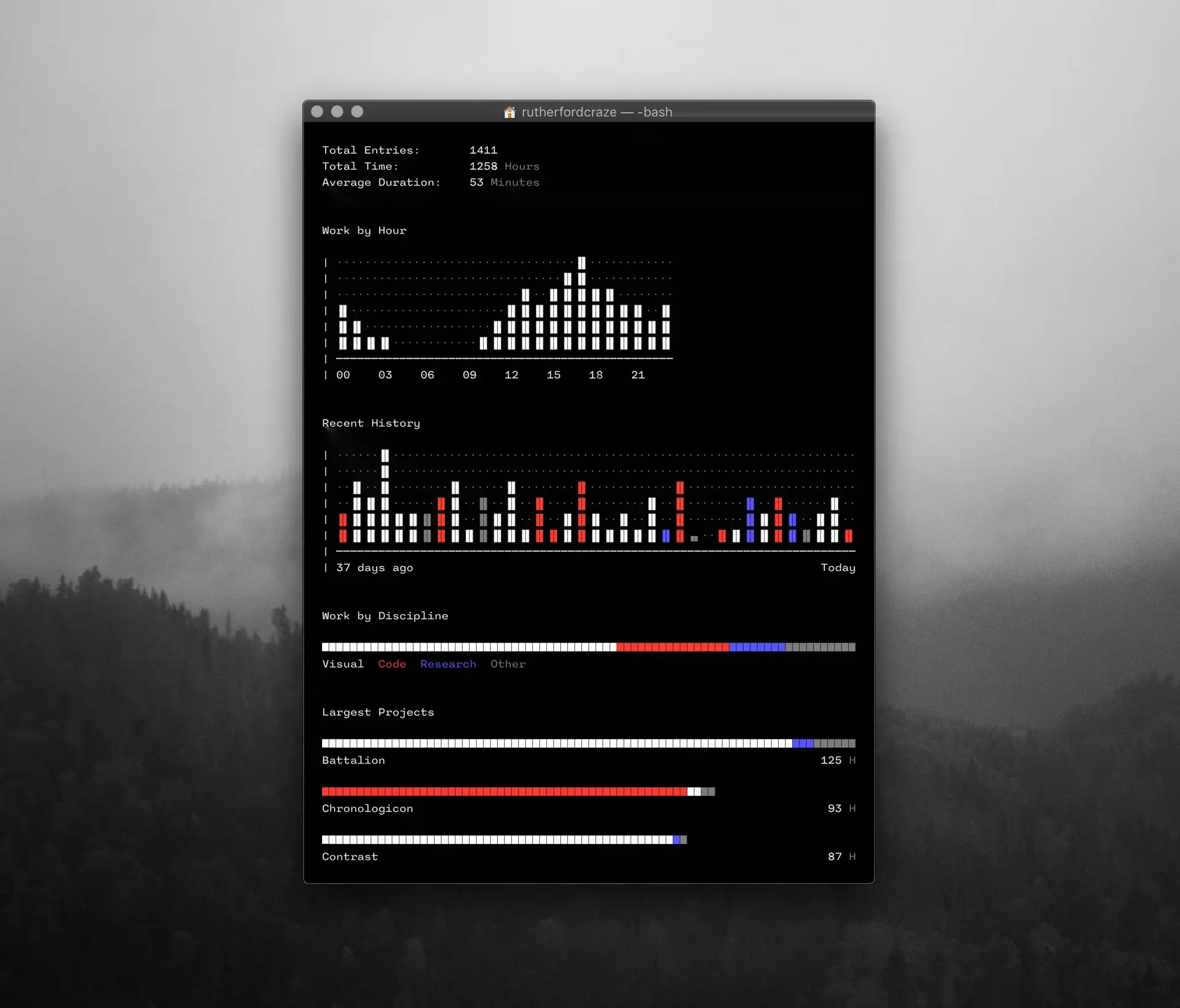
Using a timer system automatically records start and end times, which makes time-dependent analysis possible. As seen in the dashboard above, work sessions can be broken down by hour to identify which areas of the day result in the greatest amount of work being completed. This is in opposition to instead recording a duration, which would contribute to other metrics such as total time or average duration. This decision, along with others discussed later in the essay, represents a key design decision for the end-user.
Faereld by Mika Naylor
Færeld also uses a CLI application built with Python, similar to Chronologicon. The following values are required to insert an entry:
- Area: This is similar to the Sector/Discipline inputs we previously reviewed—a way to track the type of work being completed.
- Project: If the area is designated as being project-specific (see the table below), Færeld requires a project to be selected for the task.
- Task: If the area is non-project specific, a task name must be added.
- Start and End Time: As opposed to starting a timer or entering a duration, Færeld uses a start and end time to track tasks, in the form
Day Short-Month Year // 24H.M.
| Area Code | Area Name | Project Specific |
|---|---|---|
| RES | Research | Yes |
| DES | Design | Yes |
| DEV | Development | Yes |
| DOC | Documentation | Yes |
| TST | Testing | Yes |
| IRL | Real life engagements (confs/talks/meetups) | No |
| RDG | Reading | No |
| LNG | Languages | No |
The following commands illustrate a sample input:
faereld insertArea:: RDGFrom:: 03 Dec 2017 // 17:00To:: 03 Dec 2017 // 18:30
Once logged using the insert mode, Færeld allows for the usage modes summary, projects and productivity, which provide three different visualisations based on the type of insights the user is looking for. Summary mode is shown below:
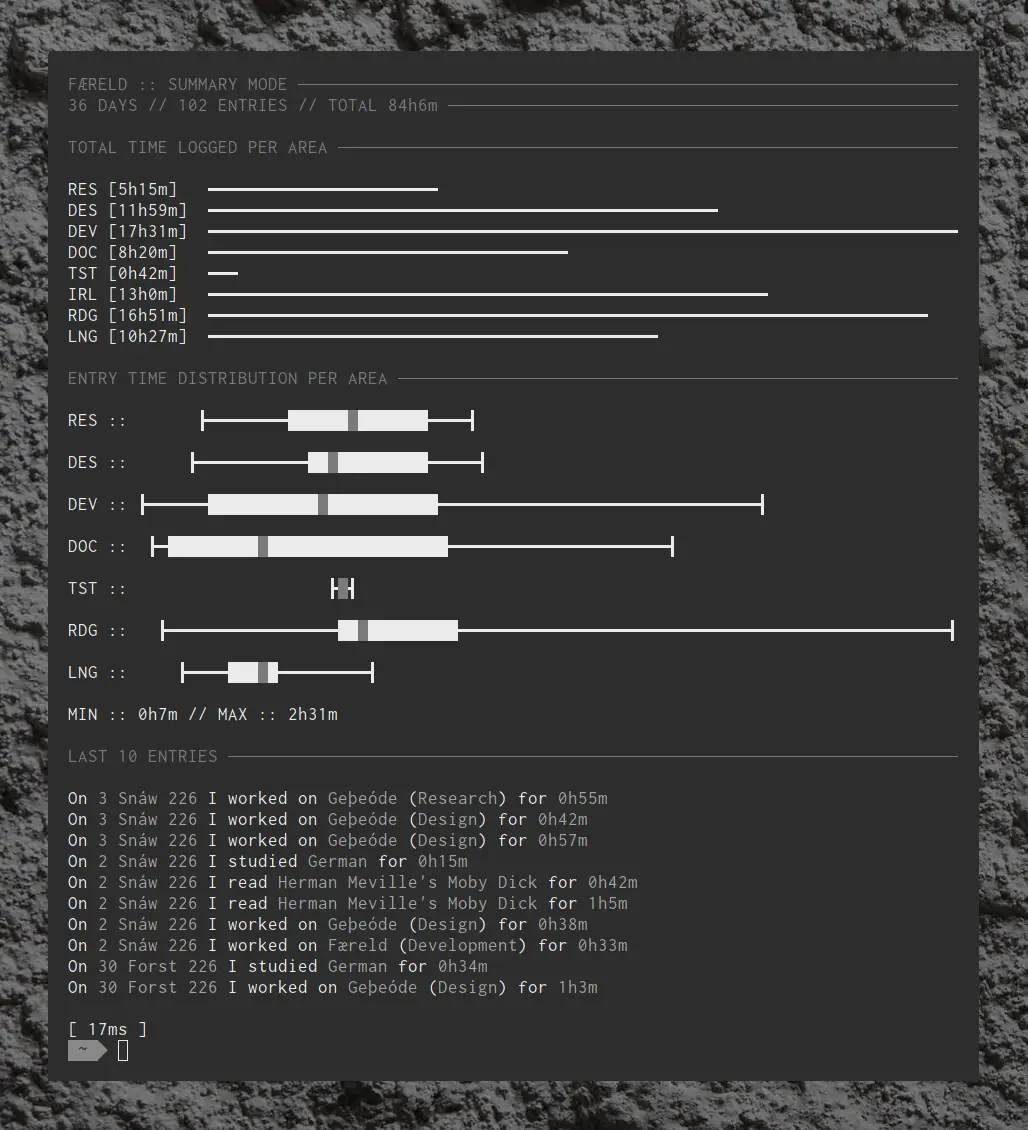
While I think this kind of visualisation looks aesthetically pleasing, I’m not convinced it provides any meaningful insight. Looking at the time distributions candlesticks, you can get a sense of the amount of time spent on an individual area relative to another but without axis labels and ticks, the visuals feel vague and mostly for show. While visualisations can prove extremely powerful in gamifying time tracking applications and identifying high-level patterns, each must serve a purpose and they aren’t developed purely for the sake of looking impressive.
Log by Josh Avanier
Josh Avanier’s Log was initially designed as a desktop app for Linux and macOS but was rebuilt/simplified to use only a command-line interface which is integrated with his wiki. The interface requires the following values:
- Sector: Uses the same convention as Horaire; this is the activity type and is represented by a single letter (e.g. D, V, R)
- Project: Tracks work against project names, as in Chronologicon
- Task description: A basic description, similar to the note value in Chronologicon and task name in Færeld.
A basic command to begin a task uses the following string template: start 'Sector', 'Project', 'Task description' and presumably ends by using the stop command. Josh adds that at the completion of the session, the work is graded with a binary score; 1 represents a successful task and 0 an unsuccessful one.
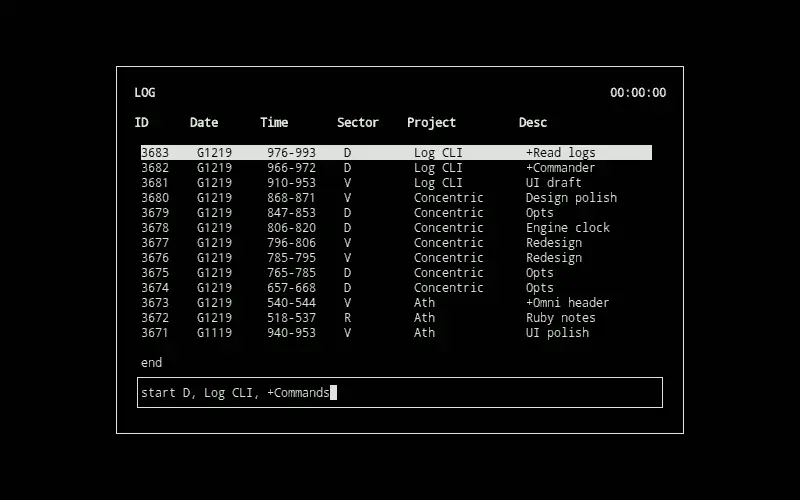
Josh notes that the Log has been deliberately designed to discourage multitasking by starting with what task he intends to do. As opposed to a post-activity recording method like the one outlined in Horaire, this timer functionality requires that the user ‘scopes’, in a sense, the work they are expecting to do. While this may feel like a small detail, explicitly defining your current task can have meaningful productivity benefits and by adding a success/failure metric to the end of each log, the user is forced to consider whether the session was successful as opposed to running an activity timer in a more ad-hoc way, where time merely represents what the user should have been working on.
Looking at the visualisation provided as part of the outdated desktop app Josh developed, one of the most useful pieces of information is the red line which presumably represents an average work session duration (this is also identified below the bar chart as 0.21 hours).
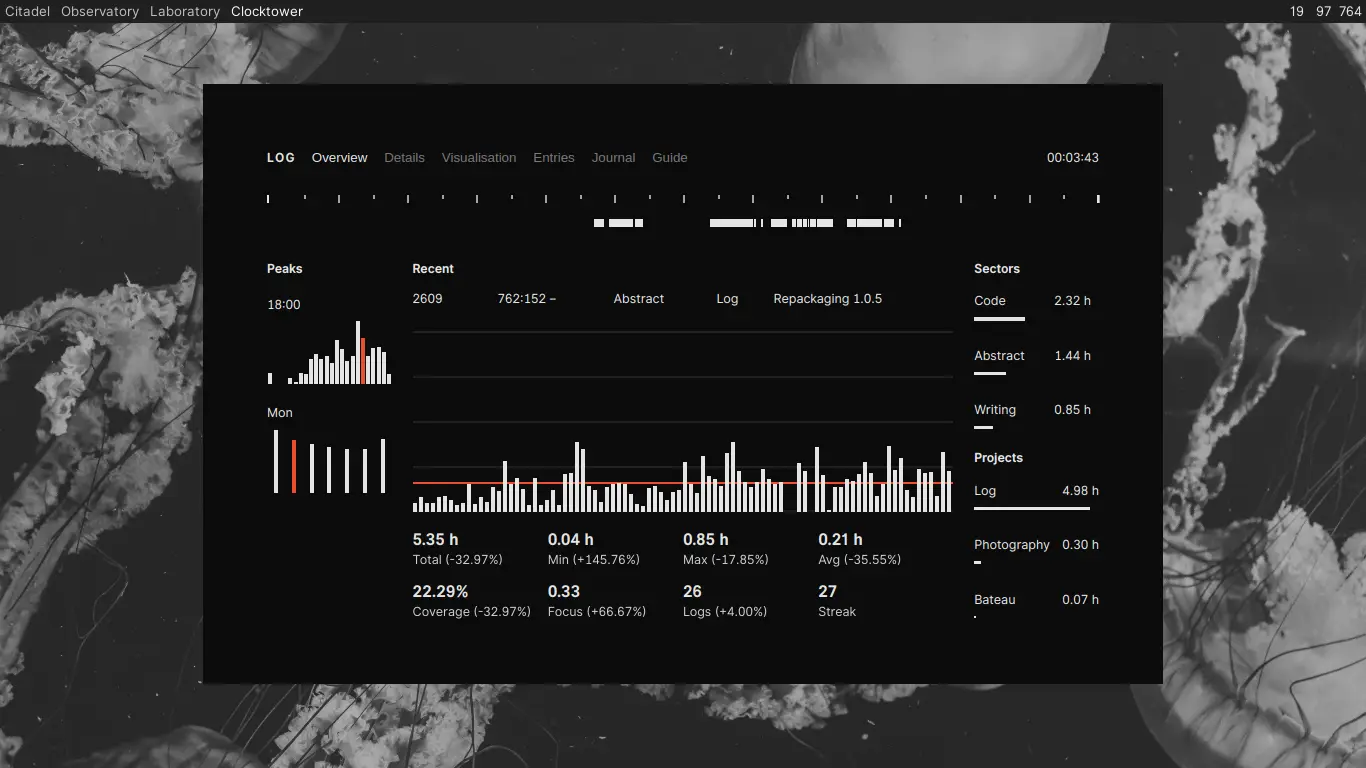
Knowing this kind of data means you can more accurately plan for the future—you can set realistic timelines for yourself knowing your historical capacity for work. In doing so you can shift from the vague knowledge that you will work on personal projects ‘from time to time’ to having data demonstrating that you average, say, 8 hours of available time per week and could likely schedule four 2-hour work sessions into your week without creating large disruptions.
Log by Victor Ivanov
The final example is also named ‘Log’ and was designed by Victor Ivanov. This tool parses files in a .txt format and uses PHP for visualisations. The input data is more extensive than in previous examples, requiring 6 separate pieces of data:
- Date: Entered using a YYYY.MM.DD format.
- Time: A duration value, rounded to the nearest 0.5 hours.
- Project: Similar to previous examples, adds time to a specific project.
- Task: Effectively a category for the work. Note that previous examples either had a task/category or project, not both.
- Division: This is Victor’s version of Horaire’s Sector or Chronologicon’s Discipline. This describes the high-level type of work being undertaken.
- Details: Notes/additional information to further clarify the description of the work.
Log entry format looks like the following:
DATE TIME PROJECT TASK DIVISION DETAILS2017.08.30 1.0 V-OS Development Visual Testing headers.
Victor uses five types of Divisions:
- Abstract
- Audio
- Code
- Personal
- Visual
And has also developed four Arch Projects which serve as a way to log non-project activity: Doodle, Tinker, Jam and Study.
The visualisation of these logs is extensive and essentially creates subtotals of time in hours and the percentage each project, division and task represent as a proportion of the total hours logged, demonstrated in the image below:
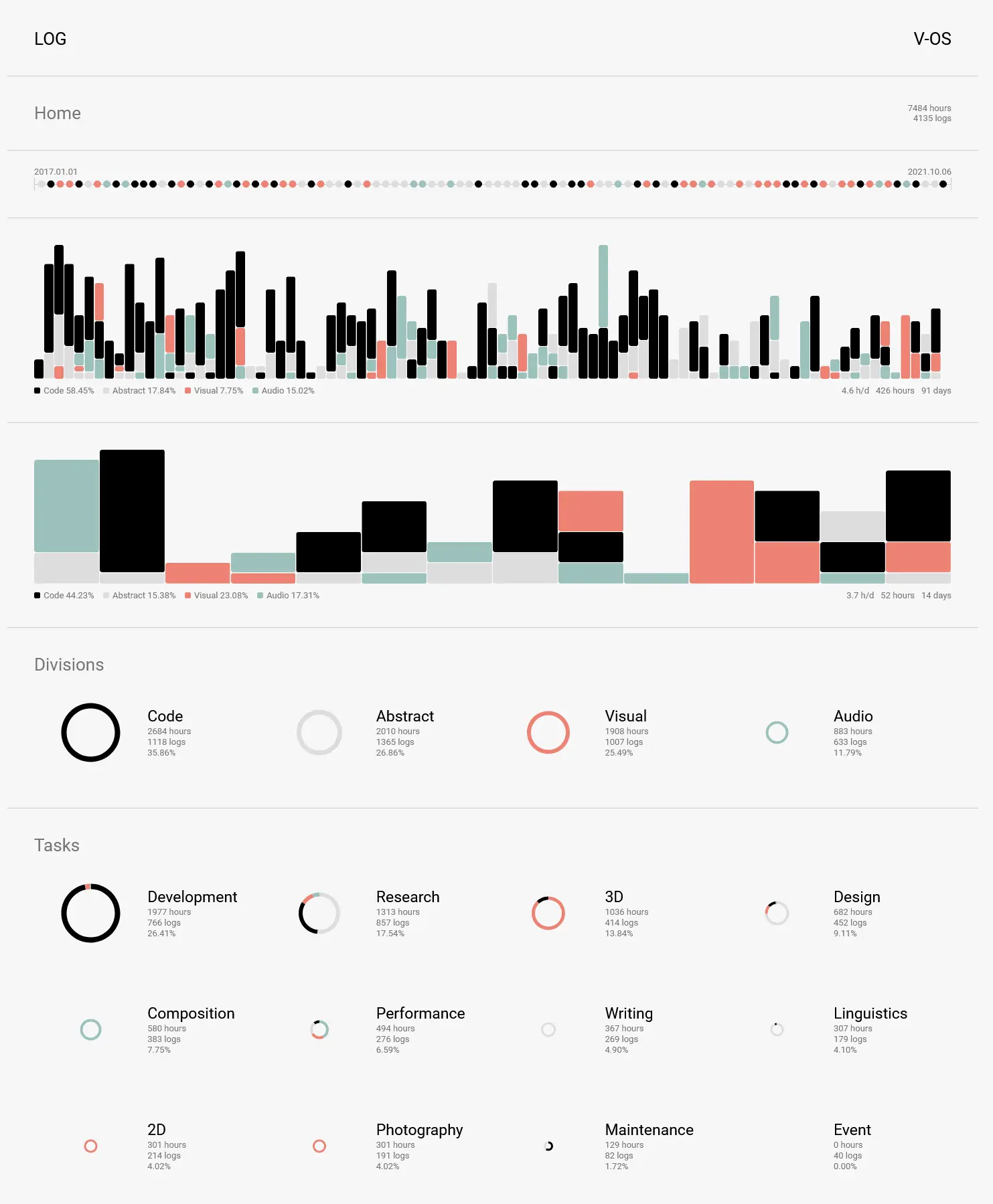
The visualisations include a timeline which looks to display the division with the most hours for each week since Victor began tracking in 2017. Also included are 90-day and 14-day bar graphs breaking down the hours and relative percentages of the four divisions. Based on these visualisations and the data inputs required, we can assume it is important for Victor to know exactly how much time is going into which types of work. Compare this to Horaire where the delineation between types of work is important only in that it serves to identify the General Productivity (Ph) value defined by Devine. This is not accidental, it is a deliberate decision made by the designers of these programs to maximise the insight generated from their time tracking systems.
Although the number of these decisions is effectively infinite, the next section of this essay will use the above examples to develop some general design principles which may assist the reader in developing a tool which suits them. Although these principles do represent practical advice for making such decisions, ideally they will serve as a philosophical framework for addressing design decisions and concepts which extend beyond the scope of this essay, including ones you will encounter in building your time tracking system.
Design Principles
Insight
Above all, a time tracker should be designed such that it serves to maximise insight for your chosen goal. For Devine, Horaire serves to output a number showing how ‘reflective’ time spent was. Chronologicon and Ivanov’s Log aim to summarise the type of work completed and how work was split between projects, using total hours and relative percentages. Færeld takes this concept a step further and adds a visualisation of work done per hour/day. Avanier’s Log has been designed, uniquely in this comparison, for insight surrounding task completion; this is why it uses a binary digit for success/failure at the completion of each log. Despite varied objectives, input methodology and visualisation styles, all of these trackers are optimised to provide their creators with insight, whatever that means to them.
When designing your time tracking solution, begin by asking what insights you would like to aim for. Would you like to know which hours of the day you complete the most creative work? By routinely tracking start and end times in all of your logs you will inevitably identify patterns which may previously have been obscured. Time tracking is not limited to work—you could build a system which tracks the minutes spent each week watching movies, split by genre. An aspiring writer may track the duration of their work sessions against the number of words written and discover that they struggle to make progress on Tuesdays. These are only a few of the countless ways time trackers can be created, of course, but in all of them they start with a clear question in mind: what do I want to learn about my life?
The importance of this question is one of the key reasons I believe commercial time tracking software (such as toggl track) is not suitable for use as a personal time tracker1. It is not that this software is unhelpful or performs poorly but that it answers different questions and solves different problems. As addressed at the beginning of this essay, I believe time tracking should be extended past the purely professional realm and into our everyday lives. A pre-built software with orthogonal goals only serves as busywork for the user; to generate authentic insight it is of paramount importance that individuals take time to build a system from strong foundational principles that directly solve for what they believe is of foremost importance.
Friction
A critical piece of time tracking design is deciding what metrics to include in the input stage. Additional data allows for a greater potential for analysis but comes at the cost of simplicity and speed. Potential of insight is the key phrase here; one of the foundational principles of good time tracking design is that the user records no more data than is necessary to achieve their desired insight. Date & time should only be tracked if the user requires time-dependent analysis, like determining which hours of the day are most productive or how working trends have changed over the previous weeks. Success-based metrics should not be tracked unless the user is looking for insight relating to the productivity of their work sessions.
A tool developed to have the lowest friction becomes an accurate one. When logs are streamlined and quick/easy to complete, the burden of tracking is reduced and more information gets captured. The reality of tracking is that it does take some time out of your day and away from other tasks and, depending on how you build the tool, there may be days where you fail to track your activities properly. The more effort each log takes, the higher the likelihood the work sessions will be inaccurate due to assigning large chunks of time to work you were supposed to be doing, or that was estimated the day after to catch up. While a log filled out haphazardly like this is likely still better than no log at all, most of the opportunity for insight is lost when too much friction is built into the systems and, based on my experience with these tools, the system is likely to be abandoned when the hassle to ‘catch up’ on previous work sessions becomes too much of a hassle.
Category Hierarchy
As demonstrated in the examples above, one of the most common ways to utilise a time tracker is to split work sessions into types and/or categories of work. While the names of these categories will vary greatly depending on the user’s needs, it serves us well to generalise a typical hierarchy of task delineation based on these examples:
- Sector/Discipline/Division
- Category or Project
- Description/Note/Details
- Category or Project
The first tier of delineation can be summarised as the type of work being done. In the examples, this type was commonly split into areas such as coding, design, research and writing but this could be designed in many other ways. Some suggestions to get you thinking about possible tracking uses are as follows:
- Professional/Personal
- Movies/Music/Television
- Consuming/Producing
- Billable/Non-Billable
The second tier represents a choice that should be made between tracking time against specific projects or using a category system instead. Though it is possible to track categories and project-based time, it seems advisable that only one methodology is picked as non-project based activities can always be classified using something similar to the Arch Projects seen in Ivanov’s Log. The decision to use a project-based system should be fairly obvious depending on the nature of the work you are tracking.
The final tier of the category hierarchy is that of the description. Despite being an optional piece of information that is not necessarily used to determine the correct ‘bucket’ work falls into, it does provide a greater level of specificity to each log and can be used to determine how much time is required for each deliverable within a project. Think of this description/note as the finest level of granularity within the system, a way to maximise the accuracy of your summaries (at the expense of additional friction).
Data Compression
Using the hierarchy established in the previous section, consider the following two examples which log three work sessions. The initial case uses convention seen in most examples and is entered in .csv format:
AREA,CATEGORY,DESCRIPTION,DURATION
Design,Typography,Modify h3 size,2.5
Writing,Journal,Daily notes,1.0
Coding,JS,Fix array function,1.5
Compare this to an alternative design where AREA and CATEGORY are combined into a single task ID (where AREA represents the first digit of the ID and CATEGORY represents the second digit) and the DESCRIPTION data is removed entirely:
ID,DURATION
22,2.5
13,1.0
35,1.5
This represents a drastic reduction in input time and friction. Such a reduction is likely to make a huge difference to the user’s time, particularly if the user is likely to generate a large number of logs each day; for an individual who works using long chunks of time, the additional time spent adding detail to each log may be worthwhile but for those who jump rapidly between projects and tasks throughout the day, such detailed logs would not be feasible and the user is more likely to eventually abandon the tool.
While the principle of data compression ties in closely with that of friction, it does ultimately constitute a separate principle which must be considered independently to maximise the usefulness of the time tracker. Friction refers to the trade-off between speed and potential dimensions of analysis whereas data compression does not necessarily reduce the potential of analysis; instead, it employs the use of established systems of shorthand to convey the same information more quickly.
Timer vs Manual Input
Another key decision to make is the choice between a timer system versus a manual input. That is, would you prefer to enter information into a timer and have it record that duration until you stop or would you prefer to add an entry after you’ve completed a work session? Using a timer system allows you to set up for a work session and more rapidly toggle start/stop if you get distracted, whereas a manual input requires an individual to recall how long they were working (and, presumably, subtract any distracted time from this duration) and results in a simpler, less fractured activity log.
Ivanov defines this decision as time resolution; deciding what level to track time to. Structuring your tracking so that you can effectively toggle your focus on and off may have implications for the way you approach work—with your attention darting in and out. Similarly, setting up a work session with metadata, a description of the work and an intended goal may serve not only as a tracking mechanism but a north star for your next few hours, preventing multitasking.
Conclusion
This essay only scratches the surface of what I believe is currently a truly underappreciated and novel concept that may provide outsized returns on an individual’s time. Much more could be written about how to design effective visualisations or how to use time tracking in conjunction with other metrics (consider the effects of analysing the duration of productive work against biometric markers such as sleep, stress or daily exercise levels). Not only do I not feel qualified to write about these topics, I believe these topics are too complex for a topic that needs to remain fundamentally simple to be successful for most people. Those who successfully implement a time tracking system and find value in it over the medium- to long-term are best placed to identify how to extend their systems in ways that truly add value and not complexity for its own sake.
As has been made clear throughout this essay, seemingly simple decisions can make large impacts on your approach toward work, which makes it impossible to overstate how important it is to think these decisions through deeply before designing your time tracking tool. This piece has deliberately avoided prescribing any one methodology or design choice over the other, as effective time tracking is a personal project which must be approached with patience, clarity and consideration at every stage of development. Once you have built a prototype, be sure to use it as much as possible and look for ways to refactor or optimise the design. Thoughtful compression of data and a clear objective will make it easier to get the tiny details right, which will likely result in massive time savings over the long term.
I hope this essay has served as a useful jumping-off point into the world of time tracking systems. If you have any questions or would like to chat about implementation or ideas for your own system please email me and I’d be happy to discuss the matter further.
Footnotes
- While I believe it is important to eventually build your own time tracking system, I do recognise this requires both technical ability and time. If you have decided on the design principles of your system but are unable or unwilling to develop your own logging solution, I would suggest reading through the documentation of timewarrior, open-source software which uses the command line. I believe this represents the best software available to users looking for pre-built time tracking software. Of course, you should take time to think through if/how your desired system will integrate with the commands built-in to the tool before tracking anything.